
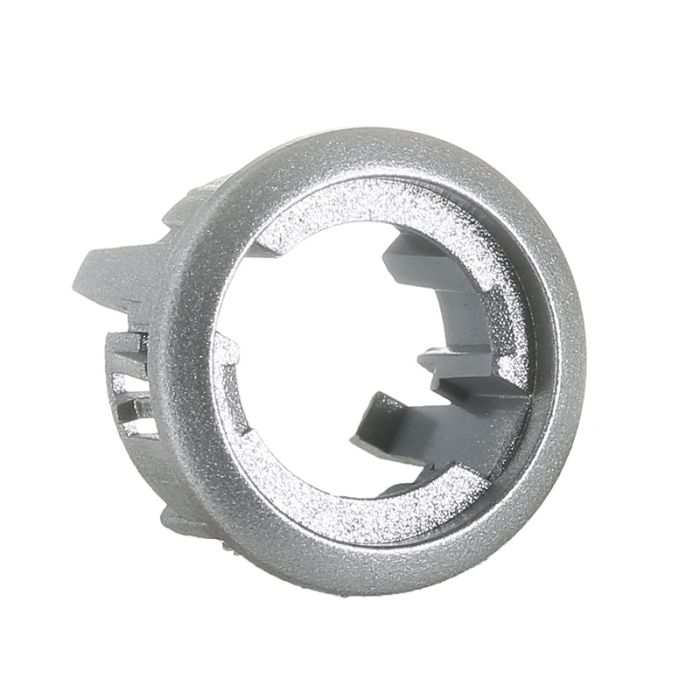
Microwave Button Holder
Genuine microwave button holder – identical to the original factory-fitted part for Bauknecht, Ikea and Whirlpool microwaves as shown unless advised otherwise
Description
This is a genuine microwave button holder, supplied as the same component fitted at the factory, so it fits into the original control panel fascia, holds the buttons in their correct positions, and restores the tactile response the control panel had when it was new.
The button holder is the moulded carrier that holds the front-panel buttons in place and aligned over the membrane switches beneath. Every press of the control panel is transmitted through it, and over years of use the moulding can crack at the button apertures, distort so that buttons stick or sit proud of the fascia, or break at the retaining clips that hold it in place.
Once the holder is damaged, the buttons no longer operate cleanly and the panel can become difficult or impossible to use. Fitting a genuine replacement restores proper button action and the clean, factory-fresh look of the control panel.
This button holder fits several Bauknecht, Ikea, and Whirlpool models that share the same control panel platform, which is why the same component appears across more than one brand. Because it is moulded to a specific button layout and clip arrangement, it is not interchangeable with visually similar holders from other ranges, so you must confirm the full model number against the compatibility list before ordering.
This button holder will only fit the models as shown or as specifically advised and will not fit any others even if it looks the same, it probably won't be as there are several that look alike yet are not. If you are unsure please don't hesitate to contact us and ask for assistance.
 Technical Notes
Specifications: Genuine microwave button holder. Product code: C00311165. Type: moulded button carrier for the microwave control panel. Material: impact-grade plastic. Mounting: clips into the original control panel fascia. Finish: as per model.
Safety note: Isolate the microwave from the mains supply before carrying out any work. Microwaves contain a high-voltage capacitor that can retain a lethal charge long after the appliance has been unplugged — do not open the outer casing or touch any internal components unless the capacitor has been safely discharged by a competent person. The button holder is located on the low-voltage control panel side of the appliance, but if access requires removing the outer case, do not attempt the work without the appropriate knowledge and safety precautions. Handle the control panel fascia carefully to avoid cracking the plastic or disturbing the membrane switch beneath. Never force the holder into position or operate the microwave with the fascia removed.
BAUKNECHT MICROWAVE
DMCG6145IN, DMCG6245IN, DMCG7245IN, EMCCD5140IN, EMCCD5140SW, EMCCD6140IN, EMCCD6244IN, EMCCD6344, EMCCD6344IN, EMCCS5140IX, EMCCS7140IN, EMCCS8660IN, EMCHD5140IN, EMCHD6140AL, EMCHD6140IN, EMCHD6140RVS, EMCHD6244IN, EMCHD7140IN, EMCHD7244IN, EMCHS5140IX, EMCHS6140IN, EMCHS6144IN, EMCHS6145IN, EMCHS6244IN, EMCHS7140IN, EMCHS7140TI, EMCHS7244IN, EMCHS7245IN, EMCHS7945TI, EMGHD6140IX, EMGHD6244IN
IKEA MICROWAVE
MWC10S1, MWC10S3, MWN410S2, MWN410S3, MWN410W1, MWN410W2, MWN410W3, MWN410W5
WHIRLPOOL MICROWAVE
AMW510IX2, AMW510IX3, AMW510IX4, AMW518IX1, AMW518IX3, AMW520IX2, AMW545IX1, AMW545IX2, AMW545IX3, AMW545IX4, AMW575IX1, AMW575IX4, AMW575TI1, AMW575TI3, AMW578IX1, AMW578IX3, AMW595IX1, AMW595IX2

Get Expert Microwave Spare Part Help
Can't find your model number listed or need help identifying the correct part? Contact our parts advisors with your full model and serial number, and we'll verify the correct part for your appliance.
| Further Description |
Common Faults & SymptomsThe following symptoms are commonly reported when a microwave button holder reaches the end of its serviceable life. Use this as a diagnostic guide before ordering a replacement — if more than one of these is present, the holder is the likely culprit. 1
BUTTONS DO NOT RESPOND WHEN PRESSED
If one or more buttons on the control panel no longer operate, or require a much firmer press than usual, the button holder may have cracked at the button aperture or distorted so that the button no longer reaches the membrane switch beneath. This is a common failure and cannot be repaired once the holder is damaged.
2
BUTTONS STICK OR SIT PROUD OF THE FASCIA
A distorted holder can leave the buttons protruding from the fascia, sitting at an angle or sticking in the pressed position. This affects both the appearance and the operation of the panel, and can cause buttons to press themselves if the holder is badly warped.
3
VISIBLE CRACKS OR SPLITS IN THE HOLDER
Cracks typically appear at the button apertures or along the retaining clips, where the plastic is thinnest. Once a crack opens, the holder loses its grip on the buttons and the fascia, and the panel becomes progressively harder to use.
4
HOLDER HAS COME LOOSE FROM THE FASCIA
If the holder has detached from the control panel fascia, or moves when the buttons are pressed, the retaining clips have failed. A loose holder no longer positions the buttons correctly and can damage the membrane switch behind it over time.
5
BUTTONS FALL OUT OR FEEL LOOSE
If individual buttons drop out of the panel or feel loose when pressed, the holder is no longer retaining them properly. This is often the point at which the panel becomes unusable and the holder must be replaced.
6
SOME FUNCTIONS CAN NO LONGER BE SELECTED
When a button no longer makes proper contact with the membrane switch, the function it controls becomes inaccessible. Power levels, cooking times, presets or the start button may stop working even though the panel display is otherwise normal.
7
BUTTON HOLDER IS DISCOLOURED, SCUFFED OR STAINED
Heavy use, cleaning chemicals and food deposits can leave the holder discoloured or sticky. A holder that is difficult to clean or visibly marked often has weakened retaining clips as well, and is frequently replaced for cosmetic reasons before it fails completely.
8
BUTTONS PRESS THEMSELVES OR TRIGGER UNEXPECTEDLY
A badly warped holder can press one or more buttons against the membrane switch without any input from the user. This causes the microwave to select functions, change settings or start cooking on its own, and the appliance should not be used until the holder has been replaced.
Fitment GuidanceThis part is compatible only with the models listed in the compatibility matrix above. Even if a part looks visually identical, internal specifications can differ.
Diagnostic TipsBefore concluding that the part has failed, carry out these checks to rule out other causes.
Installation GuideThese steps describe the general procedure. The exact sequence varies between models, so always consult the appliance service manual where available.
Before Ordering, Check These First
Disclaimer: The fault codes and symptoms listed above are intended as a general guide to assist with diagnosis. They cannot be taken as a definitive diagnosis of any particular problem, and other components may produce similar symptoms. Always confirm the fault with proper testing before ordering parts. |
|---|---|
| Alternate Part Number | WPLC00311165, C00311165, 481241129017, 481241129009, 481241259088, 481241259118, C00329422 |
| EAN Number | 8058331111652 |
| Manufacturer | WHI |
| Genuine Part | Yes |
Oven & Cooker Spare Parts.
Locating your correct model number is the essential first step. Avoid generic user manuals—they often cover multiple chassis types and internal variations that don't apply to your specific unit.
Ovens & Cookers
The rating plate is usually inside the oven door or on the lip of the door opening. For range cookers, check inside the storage drawer or the lower kick-plate.
Built-in Hobs
Hobs present a challenge: the data is typically on the underside. You may need to remove a drawer or look up from inside the cupboard below to view the sticker.
Intelligent Part Filtering
We only list parts with a proven failure rate or those specifically requested by engineers. This limits irrelevant results and ensures you find only what fails, rather than parts that are almost never required.
! Images & Sizes for Information Only
Oven elements and thermostats may vary in shape, terminal position, or wattage from the images shown. Manufacturers frequently alter specifications mid-production.
IMPORTANT: Many heating elements look nearly identical but have different mounting points. Do not rely on visual matching—verify via your model data or ask our specialists.
Right Part, First Time.
Ordering the wrong cooker part is a hassle and an unnecessary expense. We want to help you avoid the frustration of incorrect fitment.
Email allows us to exchange technical diagrams and exploded drawings. This is the fastest way to confirm your repair and find the cheapest compatible options available.
Unsure about a part?
Don't be hasty. One wrong digit leads to the wrong part.
Verify With An ExpertExpert Component Sourcing • Technical Sourcing • Established 1988
 Beko Europe & Global Platform Specialist
Whirlpool
Spare Parts.
Whirlpool, historically the world's largest appliance producer, has recently transitioned its European operations to Beko Europe. This legacy network means Whirlpool components are frequently found in Hotpoint, Indesit, and Ariston machines.
The Mandatory 12NC Code
Whirlpool appliances often exist in multiple technical versions. To guarantee 100% fitment, the 12NC Service Code (beginning with 85...) is vital. Without this 12-digit number, accurate identification of internal revisions is nearly impossible.
The Price Advantage
Whirlpool genuine parts can be expensive. However, because they manufacture for numerous brands, we often identify high-quality compatible or cross-branded alternatives that are technically identical but significantly cheaper.
Verified Suitability
Whirlpool systems frequently hide subtle technical changes behind identical visual shells. Our standing advice: don’t order by image alone. Ask our specialists to verify your 12NC code against the factory diagrams to ensure a perfect fit first time.
Confirm Your Whirlpool Spares
Struggling to find the right part in the Whirlpool maze? Our technical team can cross-reference your 12NC code across the entire Beko Europe network to find the exact component you need.
Contact Support TeamWhirlpool Technical Expert • Beko Europe Platform Specialist • Established 1988
UK'S Professional Appliance Spare Part Network • Established 1988
Delivery & Returns Information.
We aim to get your parts to you as fast as possible. We are transparent about lead times, stock availability, and our returns process to ensure a smooth repair.
Stock Availability
Please be aware that we show availability but do not display live stock levels online. Estimates are based on average manufacturer lead times.
Tradesman Warning
Do not arrange a tradesman until your goods have arrived and been checked. We do not cover tradesman costs due to transit delays or suitability issues.
Understanding Lead Times
Normally a UK stock item. Dispatched same or next working day. Some items may take longer depending on specific warehouse location.
Usually a UK/EU stocked item but with a longer lead time. Contact us before ordering for specific clarification if the repair is urgent.
Factory or Custom order items. These are ordered specifically for you and cannot ordinarily be returned. Please allow the full time indicated.
Order Transit
Orders placed before 3:00 PM (Mon-Fri) for in-stock items are typically dispatched same-day.
We use Royal Mail, DPD, and Evri. Tracking information is emailed upon dispatch. Delivery times to rural or offshore areas will vary.
Heavy/Oversized Items
Items such as dishracks, tubs, and glass cooktops may incur additional fees due to weight and specialised packaging requirements. We will contact you if additional shipping is required.
Returns Policy
Damages
Report transit damage within 24 hours. Include a photo of the damage and the packaging to speed up the claim process.
Cancellations
You have 14 days after delivery to cancel. This must be done via email or support ticket (not phone/chat).
Exclusions
We cannot accept returns for items that have been fitted for fault-finding, used, or custom-ordered.
How to Return an Item
Contact us with your order number and reason for return.
Wait for instructions and the correct returns address (this varies by item).
Package carefully. Do not deface original packaging. Use tracked post.
Have questions about your delivery or a potential return?
Contact Support Team98% of orders delivered on time • Expert Resolution • Established 1988