
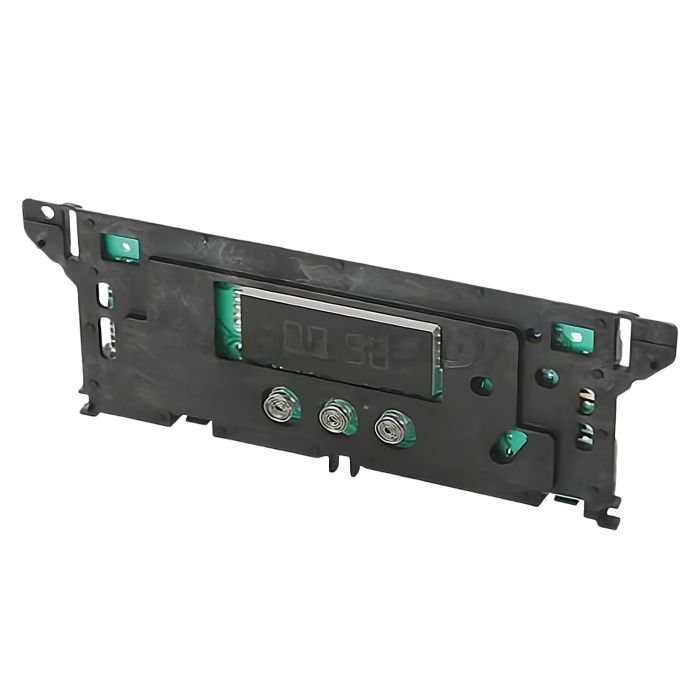
Electronic Oven Timer
Replacement electronic oven timer – compatible with Bosch ovens & cookers as shown unless advised otherwise
Description
A genuine replacement electronic oven timer for the Bosch ovens and cookers listed below.
This timer is the electronic control module behind the fascia panel and provides the clock display, minute minder, and automatic cooking functions for the appliance. It allows you to set a cooking duration, delay the start of cooking, and use the oven as a standalone kitchen timer. The module also manages the signals from the control knobs and switches, relaying them to the main control board so that the oven heats and operates as selected. Without a functioning timer module, the oven may not heat at all, may lose its clock setting, or may fail to respond to the control knobs.
Electronic oven timers fail for several reasons. The most common is heat exposure — the module sits close to the oven cavity and is subjected to repeated warming and cooling, which can degrade the internal electronics and lead to intermittent faults or complete failure.
Moisture ingress from steam or spillages can also cause corrosion on the circuit board, and voltage spikes from the mains supply can damage sensitive components. The most obvious symptoms are a blank or flickering display, unresponsive buttons, the oven failing to heat, or error codes appearing on the screen. Because the timer is a sealed electronic unit, you can't repair it and must replace it as a whole.
This timer is only known to fit the Bosch models shown or as advised, and it will not fit any others because, even if it looks the same, it probably won't. Several may look alike but not be compatible; please take time to confirm this is correct before ordering. If you are unsure, please don't hesitate to contact us and ask for assistance.
 Technical Notes
Specifications: Type: electronic oven timer / control module. Display: LED or LCD, depending on model. Functions: clock, minute minder, cooking duration, automatic start/stop. Voltage: 220–240V AC. Connection: plug connectors to the main wiring loom. Mounting: behind the fascia panel, secured by clips or screws. Supplied as: timer module only — knobs, fascia and wiring are not included. Product code: 12053568. Genuine BSH part.
Fitment guidance: This timer is known to fit only the Bosch models listed below, and will not fit any others. The model number is normally found on the rating plate on the rear of the appliance, behind the plinth or on the inner face of the oven door. Because several timer modules look almost identical while differing in connector layout, display type and software version, always confirm the full model and serial number against the compatibility list rather than relying on appearance alone. Where Siemens and Neff are shown as TBC, please check your model number with our team to confirm fitment before ordering.
Diagnostic tip: Before ordering, isolate the appliance from the electrical supply and remove the fascia panel to access the timer module. Inspect the module for visible damage such as burnt or discoloured components, a fishy or burning smell, or corrosion on the board. Check that all plug connectors are securely seated and that the wiring loom is not damaged. Test the buttons for continuity and responsiveness. If the display is blank, confirm that the appliance is receiving power and that the main fuse or circuit breaker has not tripped. If the oven fails to heat but the display works, the fault may lie with the main control board rather than the timer itself. Note any error codes displayed, as these can help identify the specific fault. Common error codes associated with timer faults include E011 (button stuck or pressed too long) and E115 (oven overheating), though these can also be caused by other components.
Installation guide: 1. Isolate the appliance from the electrical supply at the wall and allow it to cool completely. 2. Remove the oven from its housing if necessary to access the fascia panel. 3. Pull the control knobs firmly away from the fascia to expose the retaining screws. 4. Remove the screws securing the fascia panel and carefully ease it away from the appliance. 5. Photograph the wiring connections on the rear of the timer module before removing anything. 6. Disconnect the plug connectors from the timer module, taking care not to pull on the wires. 7. Release the clips or remove the screws securing the timer module and lift it out. 8. Fit the new timer module in position and secure it with the original fixings. 9. Reconnect the plug connectors to the correct sockets. 10. Refit the fascia panel and control knobs. 11. Restore the power and set the clock. 12. Test all timer functions — minute minder, cooking duration, and automatic start/stop — to confirm correct operation.
Safety note: Always isolate the appliance from the mains before beginning any work. The timer module contains sensitive electronic components and can be damaged by static electricity — touch a known earth point before handling the new module. Never force a connector into the wrong socket, as this can damage the module and the wiring loom. If the new module does not resolve the fault, do not continue to replace parts randomly; instead, carry out a systematic diagnosis of the wiring, main control board and other components. If you are unsure about any aspect of the repair, contact a qualified appliance technician.
BOSCH OVEN & COOKER
HAF113BR0/01, HAF113ER0/01, HAF113ES0/01, HAF113ES0/02, HAF113ES0/03, HAF113ES1/01, HAF113ES1/02, HAF113ES1/03, HAF134EB0Q/01, HBF113BA0Q/01, HBF113BA0Q/02, HBF113BA0Q/03, HBF113BA0Q/04, HBF113BA0Q/05, HBF113BA0Q/07, HBF113BA0Q/08, HBF113BA0Q/09, HBF113BA0Q/10, HBF113BA0Q/11, HBF113BA0Q/12, HBF113BA0Q/13, HBF113BA0Q/14, HBF113BA0Q/15, HBF113BA0Q/16, HBF113BA0Q/18, HBF113BA0Q/19, HBF113BA0Q/20, HBF113BA0T/02, HBF113BA0T/03, HBF113BA0T/04, HBF113BA0T/05, HBF113BA0T/06, HBF113BA0T/07, HBF113BA0T/08, HBF113BA0T/09, HBF113BA0T/10, HBF113BA0T/11, HBF113BA0T/14, HBF113BR0/01, HBF113BR0A/01, HBF113BR0A/02, HBF113BR0A/03, HBF113BR0A/04, HBF113BR0A/05, HBF113BR0A/06, HBF113BR0A/07, HBF113BR0A/09, HBF113BR0A/10, HBF113BR0A/11, HBF113BR0A/12, HBF113BR0A/15, HBF113BR0A/16, HBF113BR0A/17, HBF113BR0A/18, HBF113BR0B/01, HBF113BR0B/02, HBF113BR0B/03, HBF113BR0M/04, HBF113BR0M/06, HBF113BR0M/07, HBF113BR0M/08, HBF113BR0M/10, HBF113BR0M/12, HBF113BR0M/13, HBF113BR0M/15, HBF113BR0M/19, HBF113BR0N/01, HBF113BR0Q/05, HBF113BR0Q/07, HBF113BR0Q/08, HBF113BR0Y/01, HBF113BS0/01, HBF113BS00/01, HBF113BS0Z/01, HBF113BS1/01, HBF113BS1/02, HBF113BV0Q/02, HBF114BL0R/01, HBF114BR0R/01, HBF114BR0Y/01, HBF114BV0R/01, HBF114EB0R/01, HBF114ES0/01, HBF133BA0, HBF133BR0/01, HBF133BR0/02, HBF133BR0/15, HBF133BR0/19, HBF133BR0W/01, HBF133BS0A/01, HBF133BS0A/04, HBF133BS0A/05, HBF134EB0A/05, HBF134EB0A/08, HBF153BB0, HBF153BS0/01, HBF153EB0, HBF153ES0, HBF153ES1, HBF154ES0/01, HBF154YS0/01, HBF514BR0T/01, HBF514BS0R/01, HBF514BS0T, HBF534ES0I/01, HBF534ES0Q/01, HBF534ES0Q/02, HBF534ES0R/01, HBF534ES0R/02, HBF534ES0T/01, HBF534ES0T/02, HBF554YS0R/01, HBF554YS0R/02, HBJ133BR0W/01, HBJ358YS0T/01, HBJ534ES0/01, HBJ534ES0Z/03, HEF514BS0R/01, HHF113BA0B/01, HHF113BR0B/01, HHF313BR0B/01, HKN39A020U/01, HKN39A020U/02, HKN39A020W/01, HKN39A050U/02, HKN39A050W/01, HKN39A060U/01, HKN39A060U/02, HKN39B220R/01, HKN39B220R/02, HKQ38A150M/02, HKR390020/01, HKR390050/01, HKR390050/02, HKR39A150/01, HKR39A220W/01, HKR39A250U/02, HKR39A250W/01, HKR39A250W/03, HKR39B150/01, HKR39C150/01, HKR39C150/02, HKR39C220/01, HKR39C220/02, HKR39C220/20, HKR39C250/01, HKR39C250/02, HLN39A020/01, HLN39A020/02, HLN39A050U/01, HLN39A060U/01, HLR390020/01, HLR390020/02, HLR39A020/02, HWR391I70T/01, HWR391I70T/02, HWR391I70T/03, HWR391I70T/04, HWR391I70T/05, HXC350H50N/01, HXC350H50N/02, HXC350H50N/05, HXC390G20T/01, HXC390G20T/02, HXC39AE50Q/05, HXC39AG20Q/05, HXN390D20/01, HXN390D20/03, HXN390D20/04, HXN390D20L/01, HXN390D20L/03, HXN390D50/01, HXN390D50L/01, HXN390D50L/03, HXN390D60L/01, HXN390D60L/02, HXN390D60L/05, HXN390G50H/04, HXN390I20N/01, HXN391E20N/01, HXN391H20N/01, HXN391H20N/03, HXN391H20N/04, HXN39AD20/01, HXN39AD21, HXN39AD50/01, HXN39BD50/01, HXN39BD50/04, HXQ38AE50M/02, HXQ38AE50M/05, HXQ38AE50M/06, HXR390D50/01, HXR390D50/03, HXR390D50/05, HXR390E50N/01, HXR390H20T/01, HXR390H20T/02, HXR390H20T/03, HXR390H20T/04, HXR390H29T/01, HXR390H29T/03, HXR390I50N/01, HXR391H50T/01, HXR391H50T/02, HXR391H50T/03, HXR39AG20/01, HXR39ID50Y/01, HXR39ID50Y/02, HXR39IG20/06, HXR39IH20, HXR39KI50A, HHF113BA0B18
SIEMENS OVEN & COOKER
TBC – Please check your model number with our team to confirm fitment.
NEFF OVEN & COOKER
TBC – Please check your model number with our team to confirm fitment.

Get Expert Oven & Cooker Spare Part Help
Can't find your model number listed or need help identifying the correct part? Contact our parts advisors with your full model and serial number, and we'll verify the correct part for your appliance.
| Further Description |
Common Faults & SymptomsThe following fault codes and symptoms are commonly reported when this part begins to fail. Use this as a diagnostic guide before ordering a replacement — if more than one of these is present, the part is the likely culprit. 1
Blank or Dead Display
The most obvious sign that the timer module has failed. The display is completely blank, with no clock or indicator lights, even though the appliance is receiving power. Check that the appliance is switched on at the wall and that the fuse or circuit breaker has not tripped. If power is present but the display remains dead, the timer module is the likely cause.
2
Flickering or Dim Display
A display that flickers, dims or brightens erratically is a sign that the timer module is receiving an unstable power supply or that its internal components are degrading. This can also be caused by a loose connection at the plug connector. Check the wiring for secure connections before assuming the module has failed.
3
Bosch Error Code E011 (Button Stuck or Pressed Too Long)
Displayed when one of the control panel buttons has been pressed for too long or has become stuck. The oven may beep continuously and refuse to respond. This can be caused by a stuck button on the timer module, debris or moisture on the control panel, or a fault within the module itself. Try pressing each button individually to release it, and clean the panel thoroughly. If the error persists, the timer module may need to be replaced.
4
Bosch Error Code E115 (Oven Overheating)
A fan motor that has seized or slowed down can cause the oven to overheat, triggering the E115 error code. The oven may shut down and lock the door until it has cooled sufficiently. This is a safety feature designed to prevent damage to the appliance and its surroundings. If the oven repeatedly displays E115 and the cooling fan is not running, the fan motor is the likely cause.
5
Unresponsive Buttons or Controls
If the buttons on the control panel do not respond when pressed, or only respond intermittently, the timer module may be failing. This can also be caused by a dirty or damaged control panel overlay. Clean the panel and check for any physical damage. If the buttons still do not work, the timer module is the likely cause.
6
Oven Not Heating or Not Responding to Controls
A faulty timer module can prevent the oven from heating, even though the display appears to work. The module relays signals from the control knobs to the main control board, and if it fails, the oven may not receive the command to heat. Test the oven on a simple manual setting to see if it heats at all. If it does not, the timer module or the main control board may be at fault.
7
Clock Losing Time or Resetting Intermittently
If the clock on the oven resets to 12:00 or loses time repeatedly, the timer module may be failing to maintain its internal memory. This can be caused by a weak internal battery (in some models) or by a fault in the module itself. Check the appliance is receiving a stable power supply and that the wiring connections are secure. If the problem persists, the module should be replaced.
8
Timer Functions Not Working (Minute Minder, Auto Cook)
If the display works and the oven heats, but the timer functions — such as the minute minder or automatic cooking — do not operate, the timer module may have a software fault or a damaged internal component. Test the functions one by one to identify which are affected. If multiple functions fail, the module is the likely cause.
9
Oven Beeping Continuously or Erratically
A continuously beeping or randomly beeping oven often points to a stuck button on the timer module. The module interprets the stuck button as a continuous command and sounds the alarm. This can also be caused by moisture or debris on the control panel. Clean the panel thoroughly and check for any stuck buttons. If the beeping persists, the module may need to be replaced.
10
Visible Damage or Burning Smell from the Timer Module
Inspect the timer module for visible damage such as burnt or discoloured components, a fishy or burning smell, or corrosion on the board. Any of these indicate the module has failed and must be replaced. Do not attempt to repair a damaged module — it is a sealed electronic unit. Isolate the appliance immediately if a burning smell is detected.
Before Ordering, Check These First
Disclaimer: The fault codes and symptoms listed above are intended as a general guide to assist with diagnosis. They cannot be taken as a definitive diagnosis of any particular problem, and other components may produce similar symptoms. Always confirm the fault with proper testing before ordering parts. |
|---|---|
| Alternate Part Number | 12024494, 12022956, 5045383976097, BSH12024494 |
| Manufacturer | BSH |
| Genuine Part | Yes |
Oven
Timers & Clocks
Oven timers and clocks may be analogue or electronic. A faulty timer can stop the oven working entirely. It’s essential to identify the correct part to avoid downtime and ensure safe operation.
Replacing Oven Timers & Clocks
Timers act as a large mains switch in your oven. Faulty timers can result in a dead oven or clock, and incorrect wiring may cause electrical faults. Always ensure a professional is consulted for installation if unsure.
Timers and clocks vary by make and model, with older analogue units differing significantly from modern electronic LED or LCD versions. Ensure you have the correct model and serial number before ordering.
Can't Find The Oven Timer or Clock You Need?
Oven timers and clocks can be confusing due to their model-specific nature. Provide your oven or cooker details and we’ll help you find the correct replacement, including low-cost compatible options if available.
Contact Support Team BSH Group Platform Specialist
Bosch / Neff / Siemens
Spare Parts.
Bosch appliances are produced by the BSH Group, which also owns Neff and Siemens. Many components are shared across these brands and their regional variants, making accurate model identification essential for correct part selection.
ENR-Based Identification Is Mandatory
Almost all Bosch, Neff, and Siemens appliances are produced in multiple variants. To ensure correct fitment, the full model number or ENR number from the rating plate is required. Visual comparison alone is unreliable.
Cross-Brand Compatibility
Many functional components, such as heating elements, motors, switches, and pumps, are shared across Bosch, Neff, Siemens, and other BSH-owned brands. Correct cross-referencing can significantly reduce repair costs without compromising quality.
Variant Sensitivity
Bosch parts can vary significantly by revision, and some genuine components are expensive. Ordering without confirming the ENR can result in incorrect or incompatible parts. When in doubt, verification is strongly advised.
Confirm Your Bosch, Neff or Siemens Spares
Provide the full model or ENR number, and our technical team will check your appliance against the correct BSH platform to ensure exact fitment.
Contact Support TeamBSH Specialist • Cross-Brand Parts Expertise • Established 1988
UK'S Professional Appliance Spare Part Network • Established 1988
Delivery & Returns Information.
We aim to get your parts to you as fast as possible. We are transparent about lead times, stock availability, and our returns process to ensure a smooth repair.
Stock Availability
Please be aware that we show availability but do not display live stock levels online. Estimates are based on average manufacturer lead times.
Tradesman Warning
Do not arrange a tradesman until your goods have arrived and been checked. We do not cover tradesman costs due to transit delays or suitability issues.
Understanding Lead Times
Normally a UK stock item. Dispatched same or next working day. Some items may take longer depending on specific warehouse location.
Usually a UK/EU stocked item but with a longer lead time. Contact us before ordering for specific clarification if the repair is urgent.
Factory or Custom order items. These are ordered specifically for you and cannot ordinarily be returned. Please allow the full time indicated.
Order Transit
Orders placed before 3:00 PM (Mon-Fri) for in-stock items are typically dispatched same-day.
We use Royal Mail, DPD, and Evri. Tracking information is emailed upon dispatch. Delivery times to rural or offshore areas will vary.
Heavy/Oversized Items
Items such as dishracks, tubs, and glass cooktops may incur additional fees due to weight and specialised packaging requirements. We will contact you if additional shipping is required.
Returns Policy
Damages
Report transit damage within 24 hours. Include a photo of the damage and the packaging to speed up the claim process.
Cancellations
You have 14 days after delivery to cancel. This must be done via email or support ticket (not phone/chat).
Exclusions
We cannot accept returns for items that have been fitted for fault-finding, used, or custom-ordered.
How to Return an Item
Contact us with your order number and reason for return.
Wait for instructions and the correct returns address (this varies by item).
Package carefully. Do not deface original packaging. Use tracked post.
Have questions about your delivery or a potential return?
Contact Support Team98% of orders delivered on time • Expert Resolution • Established 1988